Daily Goals Email
Start each weekday with your goals, Smart Bets and Experiments delivered directly to your inbox.
What You’ll Receive
The Daily Goals Email brings your most important planning elements together in one convenient morning message. Emails arrive Monday through Friday only—no weekend interruptions.
Every Weekday (Monday-Thursday)
Your email includes:
- Your Weekly Success Story: See what you’re working toward this week
- Active Experiments: Review experiments you’ve created in the last 7 days
- Quick Links: Jump directly to view your Goals or edit your Experiments and Smart Bets
Monday Morning
If you haven’t created a weekly success story yet, you’ll receive:
- Encouragement to set this week’s story
- Links to your active experiments
- Quick access to start your week strong
Friday
Your end-of-week email includes:
- Prompts to plan next week’s success story
- Reminders to log your experiment progress
- Links to complete your weekly planning
Month Transitions
During the first or last week of each month (Monday or Friday), you’ll also receive:
- Quarterly Goals: Review your 90-day objectives
- Smart Bets: Check your strategic experiments across flourishing domains
- Encouragement: Prompts to update progress and keep momentum
Quarter Transitions
At the start or end of each quarter, your email includes:
- All month transition content (quarterly goals, Smart Bets)
- Encouragement to create new quarterly goals for the upcoming quarter
- Links to manage your Goals
Year Transitions
During year-end transitions, you’ll receive:
- 5-Year Vision: Reflect on your long-term direction
- Quarter transition content (quarterly goals, Smart Bets)
- Prompts for annual reflection and planning
How to Enable
- Navigate to Preferences
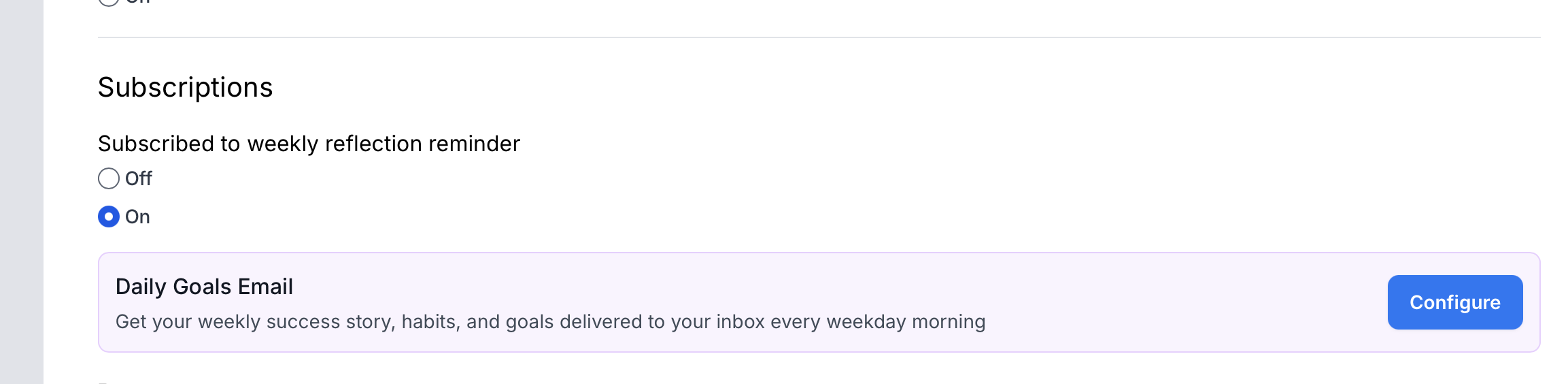
- Find the “Subscriptions” section
- Click “Configure” next to “Daily Goals Email”
- Toggle the email on
- Choose your preferred delivery time (5:00 AM - 9:00 AM)
- Click “Save Changes”
Your first email will arrive the next weekday at your chosen time.
Customizing Your Email Time
Choose any time between 5:00 AM and 9:00 AM in 30-minute increments. The email arrives in your local timezone (set in your preferences).
To change your time:
- Go to Preferences
- Click “Configure” under Daily Goals Email
- Select a new time from the dropdown
- Save your changes
The next email will arrive at your updated time.
Benefits
Start Your Day Intentionally: Review your weekly story and experiments before the day’s distractions begin.
Build Consistency: Regular email reminders help you maintain experiment tracking and progress on goals.
Stay Aligned: Weekly, monthly, quarterly, and yearly touchpoints ensure you’re always working toward what matters most.
No Weekend Noise: Emails only arrive on weekdays, respecting your time off.
Turning Off Emails
To pause or stop goal emails:
- Visit Preferences
- Click “Configure” under Daily Goals Email
- Toggle the email off
- Save your changes
You can re-enable anytime using the same steps.
Tips for Success
Set a Consistent Time: Choose a time when you’re typically starting your day—before meetings and urgent requests arrive.
Review on Mobile: The emails are optimized for both desktop and mobile, so you can review your goals anywhere.
Use the Links: Click through to update your weekly story or log experiment progress directly from the email.
Let It Guide Your Week: Use Monday’s email to set intentions, Friday’s to reflect and plan ahead.
Related Resources
- Goals: Learn about weekly success stories, quarterly goals, and 5-year vision
- Experiments and Smart Bets: Learn about designing personal experiments and strategic Smart Bets to test approaches across flourishing domains
- Aligned Action Framework: Understand how everything connects from daily tasks to five-year vision
- Preferences: Customize all your MakeTimeFlow settings
- Focus Mode: Deep work sessions to accomplish your goals